Glued To My Crafts

Join thousands of others who have gotten GLUED to our craft tutorials!

  • Home
  • About Us
  • Safety Guidelines
  • Seasonal Crafts
    • New Years
    • Valentine’s Day
    • St. Patrick’s Day
    • Spring
    • Easter
    • Mother’s Day
    • Summer
    • Father’s Day
    • Patriotic
    • Halloween
    • Thanksgiving
    • Fall
    • Winter
    • Christmas
    • Snowmen
    • Story Time
  • Monthly Themes
    • January Craft Ideas
    • February Craft Ideas
    • March Craft Ideas
    • April Craft Ideas
    • May Craft Ideas
    • June Craft Ideas
    • July Craft Ideas
    • August Craft Ideas
    • September Crafts
    • October Crafts
    • November Crafts
    • December Crafts
  • Amazon Storefront
  • Privacy Policy

Lunch Sack and Dot Sticker Gingerbread Man Craft Idea

A book titled The Gingerbread Man Loose at Christmas with a gingerbread man on the cover sits behind a brown paper bag decorated as a gingerbread man, white circle coding label crafts stickers, and @GLUEDTOMYCRAFTS at the bottom.

The Gingerbread Man is on the run again, and this time he’s racing straight into the holiday season! If your little ones love The Gingerbread Man Loose at Christmas, this easy paper bag craft will let them build a cheerful cookie friend of their own.

This project uses simple supplies you may already have at home or in the classroom. A plain brown lunch sack turns into a sweet gingerbread man with a few dot stickers, googly eyes, and a sparkly gem or two. There’s no baking, no mess, and no waiting for anything to cool. Kids can finish in about 15 to 20 minutes and proudly show off their “cookie” right away.

This craft works well for toddlers, preschoolers, and early elementary kids. It’s a great fit for a cozy afternoon at home, a classroom holiday party, or a library story time.

GRAB THE BOOK “THE GINGERBREAD MAN LOOSE AT CHRISTMAS” VIA OUR AMAZON AFFILIATE LINK

Craft Supplies:

Gather these supplies before you start so kids can jump right in:

  • Brown paper lunch bag – This becomes the gingerbread body. The brown color looks just like a fresh-baked cookie.
  • Round dot stickers – Use bright rainbow colors for a playful look, or white stickers to mimic frosting.
  • Googly eyes – Two large ones give your gingerbread man plenty of personality.
  • Markers – For drawing a happy smile or other details.
  • Gem buttons – Three gems down the middle, or swap in dot stickers instead.
  • Craft glue or glue dots – To attach the googly eyes and gems (skip this if you use self-adhesive pieces).

Directions:

Step 1: Set Up Your Bag

Lay the lunch bag flat on the table with the folded bottom flap facing down. Smooth out any wrinkles with your hands so the stickers lie flat.

Step 2: Add the Sticker “Icing” Border

Now for the fun part! Peel the dot stickers off one at a time and press them along the top edge and down both sides of the bag. Place them close together so they form a neat border, just like piped icing on a real cookie.

Here are two fun ways to decorate the border:

  • Rainbow border: Line up the colors in order (red, orange, yellow, green, blue, purple) and repeat the pattern all the way around.
  • Classic frosting border: Use all white stickers for a traditional gingerbread look.

This step is perfect for building fine motor skills. Peeling stickers takes focus and little fingers get great practice.

Step 3: Give Him Eyes

Place two googly eyes near the top of the bag, below the sticker border. Add a dab of glue to the back of each eye if they aren’t self-adhesive. Press down gently and hold for a few seconds.

Let kids decide where the eyes go. Eyes that are wide apart, close together, or a little crooked all add charm!

Step 4: Add a Sparkly Nose

Glue the gem just below and between the eyes. This shiny nose gives your gingerbread man a festive touch that catches the light.

Step 5: Draw a Big Smile

Use the marker to draw a curved smile under the nose. Kids can make it big and goofy, small and shy, or even add a tongue sticking out. Every gingerbread man has his own personality!

Step 6: Add the Buttons

Finish your gingerbread man with three “button” gems lined up down the center of the bag, below the smile.

Step 7: Let It Dry and Show It Off

If you used glue, let your gingerbread man rest for a few minutes so everything sets. Then he’s ready to join the fun! Slip a hand inside the bag to turn him into a puppet, or hang him on a wall for a festive display.

RELATED —> Potato Masher Stamped Gingerbread Man Craft
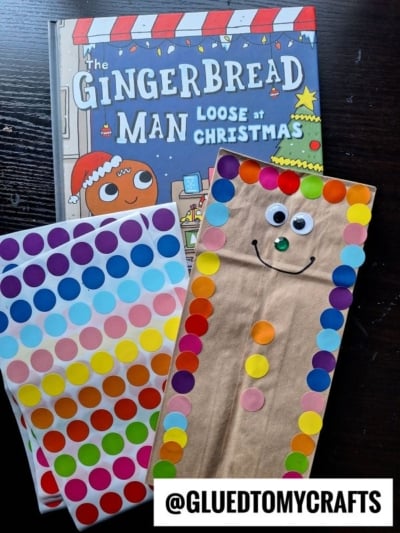
A paper bag gingerbread man craft with googly eyes and colorful sticker buttons, next to the childrens book The Gingerbread Man Loose at Christmas and sheets of dot stickers.

GRAB RAINBOW COLORED DOT STICKERS VIA OUR AMAZON AFFILIATE LINK

And there you have it! Kids can use their puppets to retell the tale, shout the famous “Run, run, as fast as you can!” line, or invent brand-new holiday adventures. It’s a simple way to build reading skills and imagination while having a blast.

So grab a stack of lunch sacks and a sheet of dot stickers. Your gingerbread crew is waiting to be made! We hope this craft brings plenty of smiles, giggles, and holiday cheer to your home or classroom this Christmas season. Happy crafting, my friends!

A blue text on a white background, perfect for creating a charming the places you'll go keepsake.


OUR PRIVACY POLICY

OUR COPYRIGHT POLICY

  • Email
  • Facebook
  • Instagram
  • Pinterest
  • Twitter
  • YouTube

Love our crafts?

Follow us on Google

Click & check the box to see us more in your search results!

LOOKING FOR SOMETHING?

EXPLORE OUR SITE:

© 2012–2026 Glued To My Crafts

© All Rights Reserved. All images, artwork, and visual materials contained herein are the exclusive property of the copyright holder and are protected under applicable copyright laws and international treaties. No individual, entity, or organization is authorized to reproduce, distribute, or use any of these images in any manner without express written consent from the copyright holder. The following actions are strictly prohibited: copying, pasting, saving, screenshotting, downloading, or otherwise distributing any images, in whole or in part, by any means or method. Furthermore, it is strictly forbidden to input, upload, submit, or process any of these images through any artificial intelligence system, generative model, machine learning algorithm, neural network, or similar technology for the purpose of creating derivative, modified, reproduced, or newly generated works of any kind. Any output, image, or material generated by artificial intelligence or comparable technology that is derived from, trained upon, or based in any way on these images is likewise subject to this prohibition. Claiming, presenting, or asserting any such AI-generated output as one's own original work is expressly prohibited and constitutes a violation of the copyright holder's rights. Any unauthorized use, reproduction, or exploitation of these images, whether by human or automated means, constitutes copyright infringement. Infringement may result in legal action, including but not limited to claims for damages, injunctive relief, and recovery of legal costs. All rights not expressly granted herein are reserved.

All activities should be supervised by an adult at all times. Please refer to our safety guidelines for more information.


Please note that all the content of the website, including printables, are for classroom and personal use only. This means that any digital item you download from our site can be used for non-commercial use only. We kindly request that you do not reproduce or sell our creations. We appreciate your understanding and cooperation in respecting our content and intellectual property rights.

Accessibility Adjustments

Powered by OneTap

How long do you want to hide the toolbar?
Hide Toolbar Duration
Select your accessibility profile
Vision Impaired Mode
Enhances website's visuals
Seizure Safe Profile
Clear flashes & reduces color
ADHD Friendly Mode
Focused browsing, distraction-free
Blindness Mode
Reduces distractions, improves focus
Epilepsy Safe Mode
Dims colors and stops blinking
Content Modules
Font Size

Default

Line Height

Default

Color Modules
Orientation Modules